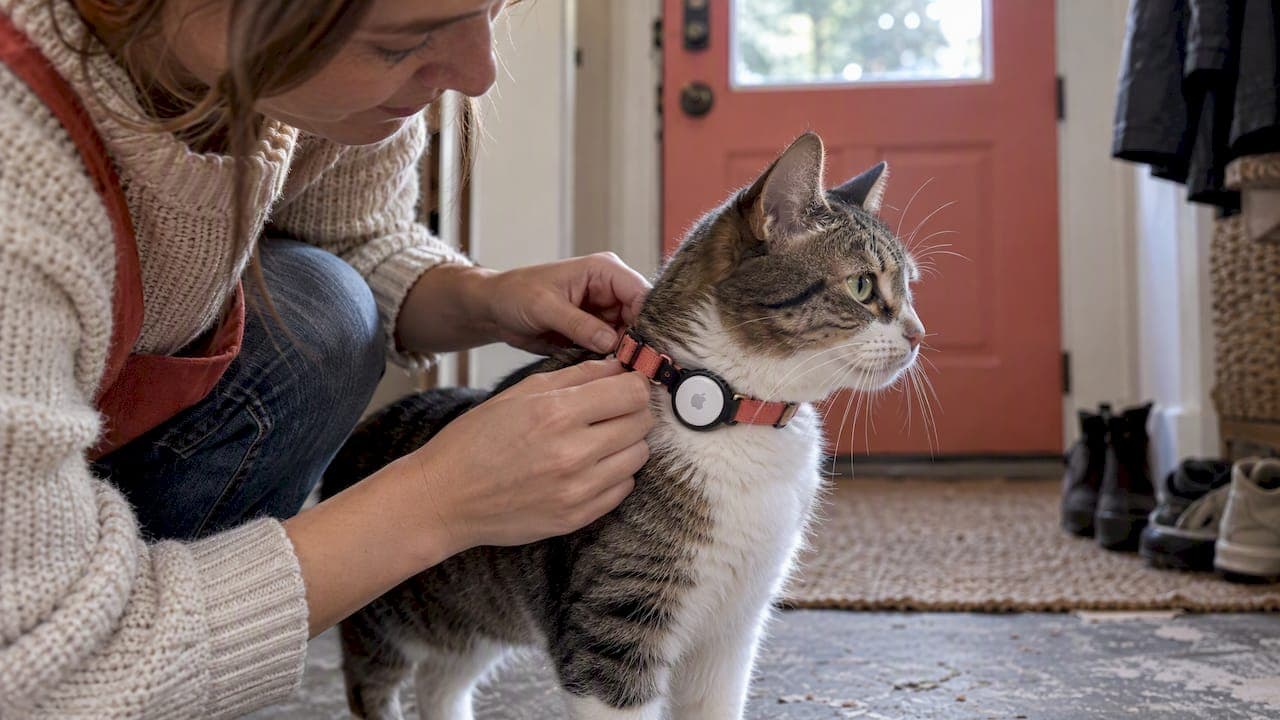
An AirTag is a sensible, low-cost way to find a cat that stays near home, especially in a busy neighborhood, but it is not a real-time GPS tracker for a cat that roams far. It relies on the Apple Find My network, and Precision Finding requires compatible Apple hardware. Pair it with a breakaway collar and a microchip, as the AVMA advises.
TL;DR:
- For cats that roam far or live in rural areas, Tractive says GPS tracking can refresh every 2–3 seconds in Live Tracking, with a subscription.
- A neighbor’s Apple device may flag an AirTag traveling with them, and the tag may beep while your cat is away.
- On a breakaway collar, keep the holder clear of the buckle, test its release, and maintain a registered microchip as permanent identification.
- Use Play Sound only nearby, since its Bluetooth range is roughly 30 feet and the beep can frighten a hiding cat into deeper cover.
Table of Contents
- How does an AirTag work on a cat?
- How reliable is an AirTag for cats in cities versus the countryside?
- How do you attach an AirTag to a cat collar safely?
- When should you choose an AirTag and when a GPS tracker?
- How do you set up an AirTag for your cat?
- What should you do if your cat goes missing?
- What have we learned from testing AirTag setups on cats?
- Is an AirTag really the right tool for your cat?
- Where can you find tested cat gear and pet tech?
- FAQ
- Sources
How does an AirTag work on a cat?
An AirTag is a small Bluetooth beacon, not a GPS unit. It has no cellular connection and no satellite receiver of its own. When your cat wanders off, the tag simply broadcasts a Bluetooth signal. If an Apple device passes close enough to hear it, that device quietly relays the tag's position to Apple's servers, and the location shows up in the Find My app on your phone. Tractive's help center describes AirTags as proximity trackers without real-time GPS that depend on this network.
That design explains everything about how an AirTag behaves on a cat. You do not get a live moving dot. You get occasional snapshots, each one triggered by a stranger's phone, tablet, or laptop walking past your cat. In a crowded street that can happen often. In a quiet field it may not happen at all.
Here is what the hardware looks like, based on Apple's tech specs:
- Size and weight: About 31.9 mm across and roughly 11.8 g, which is light for a person's keys but noticeable on a small cat once you add a holder.
- Water and dust resistance: An IP67 rating, so rain and puddles are not a problem. Apple notes that splash and water resistance can fade with wear, so treat it as protection, not a guarantee.
- Battery life: Apple's claim is around a year on a replaceable coin cell, which means no daily charging.
- Ultra Wideband: The U1 chip enables Precision Finding, the arrow-style directional guidance that only works with newer iPhones.
- Bluetooth: Handles close-range finding and the Play Sound feature.
There is also a newer model. Apple's AirTag page notes that the second generation has a louder speaker and improved Precision Finding range, and the second-generation tech specs repeat the same size, weight, and IP67 rating.
Setup is quick. You hold the tag near an iPhone, tap Connect, name it, and finish. Apple's setup guide notes that some features need a recent iOS version, and Precision Finding needs an iPhone 11 or later. We walk through the full steps for pet use further down.
What this means for you: an AirTag answers "where was my cat last seen by someone's phone?" It does not answer "where is my cat right now?" Keep that distinction in mind and every other decision in this guide gets easier.
How reliable is an AirTag for cats in cities versus the countryside?
Reliability comes down to one thing: how many Apple devices pass near your cat. In a dense neighborhood with apartments, sidewalks, and cafes, a roaming cat is rarely out of range of someone's iPhone. Location updates may arrive more often when people are around. In rural land, woodland, or a farm edge, there may be long stretches with no Apple device within Bluetooth range. The tag keeps broadcasting, but nobody hears it.
Think about where your cat actually spends time:
- Indoor cat that slips out: An AirTag is a strong fit. The cat usually hides within a few houses of home, and a quick check of Find My plus a nearby Play Sound often settles it.
- Indoor and outdoor cat in a suburb: Reasonable coverage, with gaps in backyards, alleys, and green belts where few people walk.
- Rural or wooded roaming cat: Coverage is patchy. This is where a dedicated tracker earns its cost.
- Cat that travels with you: Hotels, campgrounds, and a friend's house are all unfamiliar territory. An AirTag helps in a populated area and much less in a remote one.
The gap between an AirTag and a GPS tracker is stark in update speed. Tractive says its cat trackers can refresh every 2–3 seconds in Live Tracking mode, as stated on its model guide.
Tractive's cat trackers can update their location every 2–3 seconds in Live Tracking mode, while an AirTag only reports when an Apple device happens to pass by. That is the difference between watching a cat move and finding out where it was a few minutes ago. (Tractive)
There is one more behavior to plan for: anti-stalking alerts. Apple documents that an AirTag separated from its owner and traveling with another person can trigger a notification on that person's Apple device, and the tag may start to make a sound after a period. For a cat, this has real consequences:
- A neighbor's iPhone may show an "AirTag found moving with you" alert if your cat follows or rides along with them.
- The tag may beep while your cat is away from you, which can startle or annoy the animal.
- A beeping collar can draw attention to a shy cat, or make it bolt from a hiding spot you were hoping it would stay in.
- Your neighbors may find the alerts confusing, so a quick word with them helps.
None of this makes an AirTag a bad choice. It simply means you should treat it as a helpful locator for nearby searches, not a leash made of data.
How do you attach an AirTag to a cat collar safely?
Safety comes before tracking. A cat that climbs, squeezes through gaps, and wears a collar around the clock can get caught on branches, fences, or furniture. Choose a collar designed to release under pressure, and make sure the attachment does not interfere with it.
Start with identification. The AVMA stresses that a microchip is the permanent form of ID that still works if a collar, tracker, or tag is lost or removed, and that the chip must be registered and kept up to date. Think of the AirTag as a supplement to the chip, never a replacement for it.
Next, choose a holder style. There are three common types, and they behave very differently on a cat:
- Slide-on silicone sleeves: A one-piece stretchy holder threads onto a thin collar. Dynmeow's slide-on holder is described as molded in a single piece, about 5 g, and made to hold the tag tightly on small collars. It is easy to clean and low in profile, though you should check it stays put on your particular collar.
- Pierce-through or flush mounts: These secure the tag directly against the collar so it does not swing. Elevation Lab's TagVault for cats is marketed as ultra-compact and flush to the collar, with customer reports of a secure, low-profile fit that works with breakaway collars when installed properly.
- Dangling holders: A tag hanging from a ring is the easiest to snag and the most likely to interfere with a breakaway buckle. We avoid these on cats.
A practitioner note worth repeating comes from a collar listing guidance: always use a breakaway collar with an AirTag mount, because bulky, stiff holders can interfere with the release mechanism, while mounts that slide onto or pierce the collar tend to be lower-profile and less likely to snag.
Here is a checklist for a safe fit:
- Choose a collar that is genuinely breakaway and sized for your cat, wide enough for your holder but not heavy for your cat's body.
- Mount the holder on the collar band, away from the buckle, so the release is never blocked.
- Check that the finished collar fits comfortably. It should be snug enough not to slip over the head and loose enough to move comfortably.
- Test the breakaway by pulling the collar firmly apart with the holder attached, and confirm it releases cleanly.
- Check the skin under and around the holder regularly for chafing or hair loss.
- Watch your cat for signs of discomfort, such as scratching at the collar, hiding, or changes in appetite and play.
Pro Tip: Let your cat wear the collar and an empty holder before you add the AirTag, so you can fix fit problems without the extra weight.
If you are still choosing a collar, our guide to vet-backed calming collars for cats covers comfort and fit that apply here too. And if you want to make or adjust a collar yourself, this paracord collar tutorial has useful sizing guidance, though for cats you should keep a breakaway buckle in place.
When should you choose an AirTag and when a GPS tracker?
The honest answer depends on your cat's habits and your own priorities. Both categories can work. They solve different problems.
A Bluetooth, crowd-sourced tracker like an AirTag is cheap to run, light on maintenance, and compact. A GPS and cellular pet tracker is built for live location and wide range, at the cost of a bigger device, regular charging, and usually a subscription. Here is how they compare along the dimensions that matter:
- Update frequency: Crowd-sourced trackers update only when a compatible device passes by. GPS trackers can refresh every few seconds in live mode, per Tractive.
- Subscription: An AirTag has no monthly fee. GPS and cellular trackers generally need a plan to use the cellular connection.
- Accuracy: Both can place a cat near a street or yard. GPS trackers hold up better in open terrain where no phones are nearby, while an AirTag's best accuracy comes from Precision Finding at close range.
- Battery: An AirTag runs for around a year on a replaceable battery, according to Apple. GPS trackers need recharging, with battery life varying by model and settings.
- Weight: An AirTag weighs about 11.8 g before you add a holder. Tractive's cat-specific models weigh about 25 g, according to its help center.
- Rural performance: Weak for an AirTag when few Apple devices are around. Much stronger for a GPS and cellular tracker, as long as there is cell coverage.
- Cost: An AirTag is the cheaper starting point. GPS trackers cost more up front and over time.
Use these decision rules:
- Choose an AirTag if your cat is indoors, rarely escapes, or roams a short distance in a populated area, or if you want a low-cost backup on a cat that already has a microchip.
- Choose a GPS tracker if your cat regularly ranges far, lives in a rural or wooded area, or if you need near-real-time location and want to see where it goes during the day.
- Consider both for a cat that slips out only occasionally but lives somewhere remote. A tracker handles the worst case while the AirTag is a lighter, cheaper everyday option.
The trade-offs cut both ways. GPS tracking buys you faster, more accurate updates and better rural coverage, but it adds weight on the collar, a battery to charge, and a recurring fee. An AirTag asks for none of that, but it gives you location only when someone's device happens to be nearby.
Weight deserves special attention on cats, since many weigh just a handful of pounds. A tag plus holder plus collar should feel like nothing to your cat. If you are weighing activity and location features, our look at dog activity trackers explains why monitoring health and tracking location are different jobs, and our GPS collar roundup shows the battery and subscription trade-offs in practice. Those guides cover dogs, but the technology logic carries over to cats.
One more point: if your cat only goes out in the backyard, ask yourself whether you really need either device. A secure enclosure, a microchip, and a collar with a name tag may cover your needs, and an AirTag is the optional extra on top.
How do you set up an AirTag for your cat?
Setup is straightforward, but a few choices matter when the tag will be on an animal instead of a set of keys. You need an iPhone or iPad with a recent version of iOS or iPadOS, and compatible iPhone hardware for Precision Finding, as Apple's setup page explains. Android phones cannot complete the standard setup or use Precision Finding.
Follow these steps:
- Pull the plastic tab from the AirTag to activate the battery, and wait for the startup sound.
- Hold the tag close to your unlocked iPhone until the connection card appears, then tap Connect.
- Choose a name for the tag, such as your cat's name, and tap Continue.
- Finish by tapping Done, which adds the AirTag to the Find My app.
- Open Find My, tap the Items tab, and select your cat's tag to check its battery status and look for any firmware update prompts.
- Test Play Sound in a quiet room while the tag is still off the collar, so you know what your cat will hear.
- Mount the tag in its holder on the breakaway collar as described above, then do a final fit check.
- Know where Lost Mode lives. Open the tag in Find My and scroll to Lost Mode so you can turn it on in seconds if your cat goes missing.
Lost Mode is worth planning ahead. When you enable it, you can add a phone number so that anyone who finds the tag can reach you, and you can ask to be notified when the tag is located. Decide now which phone number you want to show, and make sure it is one you will answer. Keep in mind that Family Sharing has limits for these tags, so sort out who in your household can see and respond to the location before an emergency.
Maintenance is simple. Apple's specs point to roughly a year of battery life, so set a calendar reminder to swap the coin cell and check the battery indicator in Find My periodically. Test Play Sound again whenever you change the battery or the holder.
What should you do if your cat goes missing?
Turn the tech into a plan. A lost cat is stressful, and having a short list keeps you moving.
Start with the tag:
- Open Find My and look at the last seen location and time.
- Switch on Lost Mode so a finder can contact you and you get an alert when the tag is spotted.
- Walk to the last seen area before you start Play Sound, so you only use it within range.
Then search in the field:
- Grid the area around the last location, working door to door and yard to yard, and check low, dark spaces first. Frightened cats often hide close by.
- Call your cat's name calmly rather than shouting.
- Put out familiar scents, such as a worn T-shirt, the litter box, or bedding, and some favorite food.
- Check typical hiding spots: under porches, in bushes, behind sheds, and inside parked car wheel wells.
- Ask neighbors to look in garages, sheds, and crawl spaces they can open.
Play Sound can help, but use it with care. CNET's reporting points out that the sound can startle cats and that Precision Finding is limited by Bluetooth range of roughly 30 feet. If your cat is hiding, a sudden beep may drive it deeper into cover. Try a quiet, short test first, and stop if your cat seems frightened.
Pro Tip: Search at dusk and dawn, when the neighborhood is quiet. A scared cat is more likely to come out then, and a faint call carries farther.

If your cat is still missing, escalate. Contact local shelters and rescues, and confirm your microchip registration details are current, because the chip is what lets a shelter reach you, as the AVMA explains. Post a recent photo in neighborhood groups, and keep checking Find My for new sightings.
What have we learned from testing AirTag setups on cats?
We buy the products we review, and our pet parents test them in real homes. We also cross-check health and safety points with veterinary input, and we show the pros and cons of each product so you can judge for yourself. We do not accept payment for coverage.
For AirTag holders, what we watch is simple: how well the holder stays on the collar, how comfortable it is for the cat, and how it affects breakaway behavior. We consider fit and safety when evaluating holders for cats.
From all of that, we distilled a short safety checklist:
- Use a true breakaway collar sized for your cat.
- Choose a collar-integrated mount, not a dangling one.
- Make sure your cat is microchipped and the registration is current.
- Test Play Sound in a calm room before you rely on it.
- Re-test the breakaway release with the holder attached.
None of this replaces your own judgment or your vet's advice. If your cat has skin sensitivities, a very small frame, or a history of collar trouble, ask your vet before adding any device to the collar.
Is an AirTag really the right tool for your cat?
Here is my view. Most cat owners spend their energy choosing a tracker and too little on the collar and the microchip. The tag gets the attention, but the things that actually protect your cat are quieter: a breakaway release that works every time, a chip registered to a phone number you still use, and a cat that has been taught to come when called.
The conventional advice also falls short on expectations. People hear "tracker" and picture a live map. An AirTag will not give you that, and you should be honest with yourself about whether your cat's life needs it. For a cat that never goes far, it is a clever, cheap backup. For a cat that vanishes for hours, upgrade to a GPS tracker rather than hoping the neighborhood's phones will cover you.
Put safety first, then match the device to the cat you actually have.
— Chris
Where can you find tested cat gear and pet tech?
If you are shopping for an AirTag holder or weighing a GPS tracker, we have done the legwork. We test products in real homes, consult veterinarians on safety points, and lay out the pros and cons plainly, so you can pick gear with confidence instead of guessing from product photos.

Browse our Pet Tech category to see the trackers and gadgets we have tested, and visit our Cat Gear category for collars and holders that suit safe AirTag attachment. If you also want to keep an eye on an indoor cat while you are out, our pet camera review is a good next read. Start with Pet Tech today and find the setup that fits your cat.
FAQ
Are AirTags safe to put on cats?
They can be, when you use a properly sized breakaway collar and a low-profile holder that does not block the release. We avoid dangling holders because they snag more easily. Always keep a microchip as your cat's permanent ID, as the AVMA recommends.
Can you review the Tractive Cat Mini GPS cat tracker?
We have not tested it ourselves, so we will stick to what the maker states. Tractive describes its Cat Mini as a lighter cat-specific model with Live Tracking updates every 2–3 seconds, according to its help center. Battery life varies by model and settings, and GPS trackers generally need a subscription.
How do you put a tracker on a cat?
Choose a breakaway collar that fits well, then attach the tracker with a compact holder on the collar band, away from the buckle. Check that the collar still releases when pulled, and watch your cat closely, especially when first introducing the collar. Introduce the empty collar first so your cat can get used to it.
How do you put an AirTag in a collar?
Use a holder made for collars, such as a slide-on silicone sleeve or a flush mount. Insert the AirTag into the holder, then thread the holder onto the collar and make sure it sits flat. Re-test the breakaway release, and confirm nothing rubs the skin.